NoMemories

  • Home
  • CONTACT
  • Disclaimer
  • ABOUT
  • Home
  • CONTACT
  • Disclaimer
  • ABOUT

Checking your Ubuntu Version with GUI and Terminal

 21:46:00     No comments   

There are few ways to check which version of Ubuntu you are running. You can check with GUI and Terminal

Checking your Ubuntu version from GUI
  1. Click on Settings menu either from top right menu or from button in left launcher.
  2. Then you can see the System Setting dialog window, click on icon Detail
  3. Your version will be shown under the Ubuntu logo.
  4. Follow below screen shot for detail


Checking your Ubuntu version from Terminal
  1. Open the Terminal, click on terminal icon or press Ctl+Alt+t for shortcut
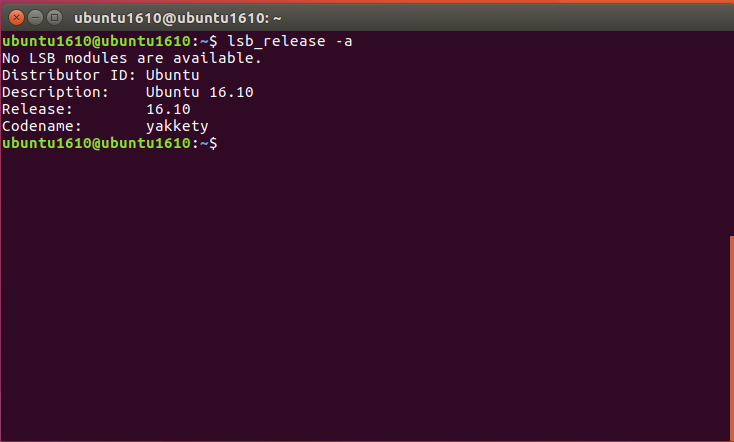
  2. Enter the command "lsb_release -a"
ubuntu1610@ubuntu1610:~$ lsb_release -a
No LSB modules are available.
Distributor ID: Ubuntu
Description: Ubuntu 16.10
Release: 16.10
Codename: yakkety


Read More
  • Share This:  
  •  Facebook
  •  Twitter
  •  Google+
  •  Stumble
  •  Digg

How to fix “unable to lock database” error in Apricity Os

 09:06:00     No comments   

This guide will show you how to fix  “unable to lock database” error in Apricity Os, For the first time encounter this issue really don't know what to do because just finish installed Apricity Os and not even touch, it showed an error, and won’t let me to update

Command to update :
pacman -Syu
Then error showed :
:: Synchronizing package databases...
error: failed to update core (unable to lock database)
error: failed to update extra (unable to lock database)
error: failed to update community (unable to lock database)
error: failed to update multilib (unable to lock database)
error: failed to synchronize any databases
error: failed to init transaction (unable to lock database)
error: could not lock database: File exists
 if you're sure a package manager is not already
 running, you can remove /var/lib/pacman/db.lck

It said, if you're sure a pakage manager is not already running, you can remove /var/lib/pacman/db.lock


So i tried to remove it:
rm /var/lib/pacman/db.lock

Awesome, it worked..Now can update and install any application
pacman -Syu


Read More
  • Share This:  
  •  Facebook
  •  Twitter
  •  Google+
  •  Stumble
  •  Digg

Install Ubuntu 16.10 in VirtualBox

 08:19:00     No comments   


These release notes for Ubuntu 16.10 (Yakkety Yak) provide an overview of the release and document the known issues with Ubuntu 16.10 and its flavors. Support lifespan Ubuntu 16.10 will be supported for 9 months until July 2017. If you need Long Term Support, it is recommended you use Ubuntu 16.04 LTS instead.

Ubuntu 16.10( Yakkety Yak) - Release date 13 October 2016.


This video will show you how to install Ubuntu 16.10 in VirtualBox 5.1.8, start from download VirtualBox untill finish Ubuntu installation.Make sure you install Guest Addition for better perfomance


Download link

https://www.ubuntu.com/download
https://www.virtualbox.org/wiki/Downloads


Read More
  • Share This:  
  •  Facebook
  •  Twitter
  •  Google+
  •  Stumble
  •  Digg

Repository for Backtrack(Working)

 23:07:00     No comments   

Backtrack 5 was 'killed off' along with all its downloads. You can now use http://www.kali.org which is the new backtrack org. Release for penetration and testing for all old backtrack as well as new features.Some people still use backtrack and they cannot do the update because their server no longer available.

You will get blow error if trying to update

W: Failed to fetch http://source.repository.backtrack-linux.org/dists/revolution/testing/binary-amd64/Packages.bz2  Sub-process /bin/bzip2 returned an error code (2)

E: Some index files failed to download, they have been ignored, or old ones used instead.


You can add below Repository under etc/apt/sources.list
deb http://backtrack.indonesianhacker.or.id/all revolution main microverse non-free testing
deb http://backtrack.indonesianhacker.or.id/32 revolution main microverse non-free testing
deb http://backtrack.indonesianhacker.or.id/64 revolution main microverse non-free testing
deb http://backtrack.indonesianhacker.or.id/source revolution main microverse non-free testing


.
Read More
  • Share This:  
  •  Facebook
  •  Twitter
  •  Google+
  •  Stumble
  •  Digg

Clone or Duplicate Nox Player and run at the same time

 04:03:00     19 comments   


Nox App Player is a free Android emulator dedicated to bring the best experience for users to play Android games and apps on PC.

If the games on your phone is eating up most of the battery and you have to charge it many times a day; If you want a more convenient way to play games or use apps; If you want to experience more stunning functions; don’t hesitate to use Nox App Player.

Key features of Nox App Player that differentiate it from the existing emulators include:

1. Totally green and free
2. Compatible to run on Windows 10
3. Virtual location function. Support all GPS-based games including Pokemon Go and Ingress. Players can walk and change speed with keyboards
4. Support multiple instances for users
5. Extreme compatibility with apps
6. In-built video recorder and macro recorder

Download link click here
This tutorial will guide you how to clone or duplicate Nox player and run at the same time


Step 1

Double click shortcut icon Multi-Drive on your Desktop or you can click MutiPlayer icon on side bar of Nox Player


Step 2

Two options available Raw and Nox. Raw for default Android emulator(new one) and Nox for duplicate existing Android emulator.You can choose either one then click Add Emulator button then wait process complete


Step 3

Raw Android has been created successfully and can do whatever you want

1. Button pencil for edit name
2. Button start for launch Android
3. Button Backup/Restore to backup and restore your android
4. Button Setting to configure performance, startup, graphic and button position
5. Button trash to delete Android


Step 4

Press start to launch your Android, now you able to play multiple games diffrent  account or diffrent games at the same time


Read More
  • Share This:  
  •  Facebook
  •  Twitter
  •  Google+
  •  Stumble
  •  Digg

Setup broadband connection in Ubuntu 16.04

 06:37:00     1 comment   


This Video will guide you how to setup broadband connection in Ubuntu 16.04 very easy and simple just few minutes it can be done. Normally we thought Linux really complicated to configure broadband because need to have script and know some command but Ubuntu 16.04 very easy because no need to use terminal, it can be done through GUI(interface)

Setting up internet connection to Ubuntu platform is very different from Windows OS, Window very simple just open broadband and just click few button to complete installation


.


Read More
  • Share This:  
  •  Facebook
  •  Twitter
  •  Google+
  •  Stumble
  •  Digg

Install TeamViewer 11 on Ubuntu 16.04

 19:27:00     No comments   


This tutorial will show you how to install TeamViewer 11 on ubuntu 16.04  very simple and easy..

TeamViewer is the first and currently only solution capable of providing remote support to Windows 10 Mobile devices. Simply download and launch TeamViewer QuickSupport on your Windows 10 mobile device.

https://www.teamviewer.com/en/download/linux/
Read More
  • Share This:  
  •  Facebook
  •  Twitter
  •  Google+
  •  Stumble
  •  Digg
Newer Posts Older Posts Home

Contributors

  • Unknown
  • zall

Popular Posts

  • Clone or Duplicate Nox Player and run at the same time
  • Clone Window 10 with AOMEI Backupper | Easy
  • Repository for Backtrack(Working)
  • Checking your Ubuntu Version with GUI and Terminal
  • Create Bootable USB For Ubuntu
  • How to fix “unable to lock database” error in Apricity Os
  • Install Conky on Ubuntu 16.04

Blog Archive

  • ▼  2016 (17)
    • ▼  November (2)
      • Hide or unhide folders and files
      • Show hidden files and folders windows 10
    • ►  October (3)
    • ►  September (3)
    • ►  August (9)
info tech. Powered by Blogger.

Copyright © NoMemories
Design by Hardeep Asrani | Blogger Theme by NewBloggerThemes.com | Distributed By Gooyaabi Templates